
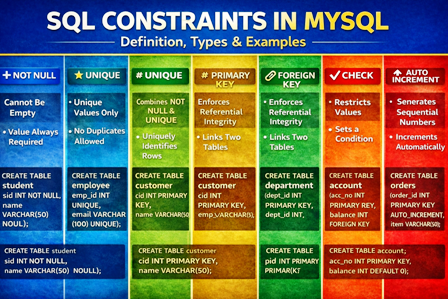
Learn SQL Constraints in MySQL with clear definitions, types, syntax, and examples. Covers NOT NULL, UNIQUE, PRIMARY KEY, FOREIGN KEY, CHECK, DEFAULT, and AUTO_INCREMENT.
SQL Constraints in MySQL:
What are SQL Constraints?
SQL constraints are rules applied to table columns to restrict invalid data and maintain data integrity.
They ensure that the data in the database is:
- valid
- consistent
- reliable
Constraints can be applied:
- at the column level (single column)
- at the table level (multiple columns)
Types of SQL Constraints
| Constraint | Purpose |
| NOT NULL | Prevents NULL values |
| UNIQUE | Prevents duplicate values |
| PRIMARY KEY | NOT NULL + UNIQUE (row identifier) |
| FOREIGN KEY | Links two tables |
| CHECK | Restricts values based on a condition |
| DEFAULT | Assigns a default value |
| AUTO_INCREMENT (MySQL) | Generates sequential values automatically |
-
NOT NULL Constraint
Prevents storing NULL (empty) values.
CREATE TABLE student (
sid INT NOT NULL,
name VARCHAR(50) NOT NULL
);
- UNIQUE Constraint
Ensures that no duplicate values are inserted.
CREATE TABLE employee (
emp_id INT UNIQUE,
email VARCHAR(100) UNIQUE
);
- PRIMARY KEY Constraint
A primary key:
- uniquely identifies each row
- is automatically NOT NULL and UNIQUE
CREATE TABLE customer (
cid INT PRIMARY KEY,
name VARCHAR(50)
);
Composite Primary Key (multiple columns)
CREATE TABLE enrollment (
sid INT,
course_id INT,
PRIMARY KEY (sid, course_id)
);
-
FOREIGN KEY Constraint
Maintains referential integrity between tables.
CREATE TABLE department (
dept_id INT PRIMARY KEY,
dept_name VARCHAR(50)
);
CREATE TABLE employee (
emp_id INT PRIMARY KEY,
emp_name VARCHAR(50),
dept_id INT,
FOREIGN KEY (dept_id) REFERENCES department(dept_id)
);
You cannot add an employee to a non-existing department.
- CHECK Constraint
Restricts values stored in a column.
CREATE TABLE product (
pid INT PRIMARY KEY,
price INT CHECK (price > 0),
quantity INT CHECK (quantity >= 1)
);
Note: MySQL versions earlier than 8.x parsed CHECK but did not enforce it.
MySQL 8+ enforces CHECK constraints.
-
DEFAULT Constraint
Assigns a value automatically when no value is provided.
CREATE TABLE account (
acc_no INT PRIMARY KEY,
balance INT DEFAULT 0
);
If no value is entered, the balance becomes 0(zero).
- AUTO_INCREMENT (MySQL specific)
Automatically generates sequential numbers.
CREATE TABLE orders (
order_id INT PRIMARY KEY AUTO_INCREMENT,
item VARCHAR(50)
);
Adding Constraints to an Existing Table
Add Primary Key
ALTER TABLE student
ADD CONSTRAINT pk_student PRIMARY KEY (sid);
Add Foreign Key
ALTER TABLE employee
ADD CONSTRAINT fk_dept
FOREIGN KEY (dept_id) REFERENCES department(dept_id);
Dropping Constraints
Drop Primary Key
ALTER TABLE student
DROP PRIMARY KEY;
Drop Foreign Key (MySQL requires the constraint name)
ALTER TABLE employee
DROP FOREIGN KEY fk_dept;
Important Points
- A primary key cannot contain NULL values
- A table can have:
- one primary key
- multiple unique keys
- Foreign key values must exist in the parent table
- A composite key consists of more than one column
- DEFAULT assigns automatic values
- CHECK restricts values based on a condition
SQL Constraints in MySQL:
Queries with Constraints
- Create the Supplier table with a Primary Key constraint
ALTER TABLE Supplier
ADD PRIMARY KEY (SID);
- Create the Supplies table with a Foreign Key constraint
supplier.SID and part.PID must exist
data types must match
CREATE TABLE supplies (
SID INT,
PID VARCHAR(5),
qty INT NOT NULL,
date_supplied DATE,
PRIMARY KEY (SID, PID, date_supplied),
FOREIGN KEY (SID) REFERENCES supplier(SID),
FOREIGN KEY (PID) REFERENCES part(PID)
);
- Create the Part table with a UNIQUE constraint
CREATE TABLE Part (
PID VARCHAR(5) PRIMARY KEY,
pname VARCHAR(20),
color VARCHAR(20),
price DECIMAL(10,2) NOT NULL,
UNIQUE (pname, color)
);
- Create the Supplier table with CHECK constraints
CREATE TABLE Supplier (
SID INT PRIMARY KEY,
Sname VARCHAR(50) NOT NULL,
branch VARCHAR(30) NOT NULL,
city VARCHAR(30) NOT NULL,
phone CHAR(10),
CHECK (SID > 0), CHECK (CHAR_LENGTH(Sname) >= 2), CHECK (phone REGEXP ‘^[0-9]{10}$’),
CHECK (city IN (‘Delhi’,’Mumbai’,’Pune’,’Goa’,’Chennai’,’Kolkata’)), CHECK (branch <> ”)
);
- Create the Supplier table with DEFAULT constraints
CREATE TABLE Supplier (
SID INT PRIMARY KEY,
Sname VARCHAR(50) NOT NULL,
Branch VARCHAR(30) DEFAULT ‘General’,
City VARCHAR(30) DEFAULT ‘Delhi’,
State VARCHAR(30) DEFAULT ‘Maharashtra’,
Phone BIGINT
);
Insert example: INSERT INTO Supplier (SID, Sname, Phone) VALUES (202401, ‘Sanika’, 9087678976);
Important Points
- PRIMARY KEY = UNIQUE + NOT NULL
- FOREIGN KEY enforces referential integrity
- UNIQUE allows one NULL value
- CHECK is fully enforced only in MySQL 8+
- DEFAULT provides automatic values
- AUTO_INCREMENT can be added to a primary key
- POP- Introduction to Programming Using ‘C’
- DS – Data structure Using C
- OOP – Object Oriented Programming
- Java Programming
- DBMS – Database Management System
- RDBMS – Relational Database Management System
- https://defineinfoloop.blogspot.com/?m=1