
Learn MySQL Data Control Language (DCL) commands. Understand GRANT and REVOKE privileges, system and object privileges, and how to create
DCL Commands in MySQL
Privilege
A privilege is a permission given by the Database Administrator (DBA).
It provides the right to:
- execute particular SQL statements
- connect to the database
- create and use objects in a schema (tables, views, etc.)
DCL (Data Control Language) commands are used to manage privileges.
Privileges are divided into two types:
- System Privileges (DDL)
- Allow user to CREATE, ALTER, DROP database objects
- Object Privileges (DML, DQL)
- Allow user to SELECT, INSERT, UPDATE, DELETE, EXECUTE on specific database objects
DCL Commands – GRANT and REVOKE
Data Control Language (DCL)
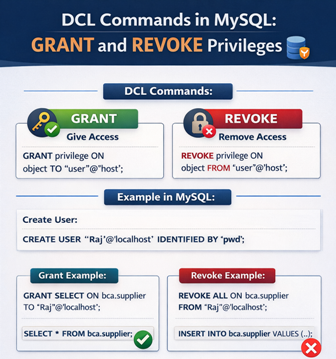
The main purpose of DCL is to control access to the data in a database by granting or revoking permissions.
MySQL (and SQL) provides two DCL commands:
- GRANT – to give privileges
- REVOKE – to take back privileges
GRANT Command
Purpose:
Used to give user access privileges to a database object.
Syntax:
GRANT privilege_name ON object_name TO ‘user_name’@’host’;
- privilege_name – ALL, SELECT, INSERT, UPDATE, DELETE, EXECUTE etc.
- object_name – table, view, sequence, procedure etc.
- user_name – user to whom the privilege is granted
REVOKE Command
Purpose:
Used to remove previously granted privileges.
Syntax:
REVOKE privilege_name ON object_name FROM ‘user_name’@’host’;
Example: GRANT and REVOKE in MySQL
Create User
CREATE USER ‘Raj’@’localhost’ IDENTIFIED BY ‘pwd’;
Verify users:
SELECT user, host FROM mysql.user;
Open Command Prompt
cd “C:\Program Files (x86)\MySQL\MySQL Server 5.0\bin”
mysql -u Raj –p
Enter password: ***
Welcome to the MySQL monitor.
Or
cd “C:\Program Files\MySQL\MySQL Server 8.0\bin”
mysql -u Raj –p
Enter password: ***
Welcome to the MySQL monitor.
Grant SELECT privilege
GRANT SELECT ON bca.supplier TO ‘Raj’@’localhost’;
Note: bca is a database name.
Raj can now read data:
SELECT * FROM bca.supplier;
But cannot insert yet:
INSERT INTO bca.supplier VALUES (204005,’Pranav’,’HD’,’Sangli’,’MH’,9878987678);
Result:
ERROR 1142: INSERT command denied
Grant ALL privileges
GRANT ALL ON bca.supplier TO ‘Raj’@’localhost’;
Now INSERT works:
INSERT INTO bca.supplier VALUES (204005,’Pranav’,’HD’,’Sangli’,’MH’,9878987678);
DELETE FROM bca.supplier WHERE sid = 204005;
REVOKE Command Example
Remove all privileges:
REVOKE ALL ON bca.supplier FROM ‘Raj’@’localhost’;
Now INSERT is denied again:
INSERT INTO bca.supplier VALUES (204005,’Pranav’,’HD’,’Sangli’,’MH’,9878987678);
Output:
ERROR 1142: INSERT command denied
- POP- Introduction to Programming Using ‘C’
- DS – Data structure Using C
- OOP – Object Oriented Programming
- Java Programming
- DBMS – Database Management System
- RDBMS – Relational Database Management System
- https://defineinfoloop.blogspot.com/?m=1