
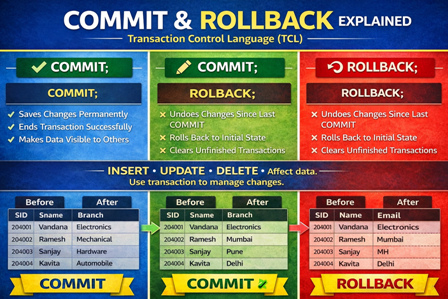
Learn TCL Commands in SQL with examples — COMMIT, ROLLBACK, SAVEPOINT and AUTOCOMMIT. Understand how transactions work and how to save or undo changes using SQL queries with outputs. Useful for DBMS, MySQL, and SQL exam preparation.
TCL Commands in SQL
Transaction Control Language (TCL) commands.
They control changes made by:
- INSERT
- UPDATE
- DELETE
COMMIT
Saves the changes permanently to the database.
Syntax
COMMIT;
ROLLBACK
Cancels (undoes) changes made after the last COMMIT.
Syntax
ROLLBACK;
Note: Works only in transactional tables (e.g., InnoDB).
AUTOCOMMIT in MySQL
By default:
autocommit = ON
Meaning every statement is automatically committed.
To control transactions manually:
SET autocommit = 0;
or
START TRANSACTION;
TCL Queries with OUTPUT
Supplier Table
SELECT * FROM supplier;
| SID | Sname | Branch | City | State | Phone |
| 204001 | Vandana | Electronics | Delhi | Delhi | 9876543110 |
| 204002 | Ramesh | Mechanical | Mumbai | MH | 9811122233 |
INSERT followed by ROLLBACK
INSERT INTO supplier VALUES
(204003,’Sanjay’,’Hardware’,’Pune’,’MH’,9822334455),
(204004,’Kavita’,’Automobile’,’Delhi’,’Delhi’,9898989898);
Output BEFORE rollback
| SID | Sname | Branch | City | State | Phone |
| 204001 | Vandana | Electronics | Delhi | Delhi | 9876543110 |
| 204002 | Ramesh | Mechanical | Mumbai | MH | 9811122233 |
| 204003 | Sanjay | Hardware | Pune | MH | 9822334455 |
| 204004 | Kavita | Automobile | Delhi | Delhi | 9898989898 |
ROLLBACK;
Output AFTER rollback
| SID | Sname | Branch | City | State | Phone |
| 204001 | Vandana | Electronics | Delhi | Delhi | 9876543110 |
| 204002 | Ramesh | Mechanical | Mumbai | MH | 9811122233 |
INSERT followed by COMMIT
INSERT INTO supplier VALUES
(204003,’Sanjay’,’Hardware’,’Pune’,’MH’,9822334455),
(204004,’Kavita’,’Automobile’,’Delhi’,’Delhi’,9898989898);
COMMIT;
Output AFTER COMMIT
| SID | Sname |
| 204001 | Vandana |
| 204002 | Ramesh |
| 204003 | Sanjay |
| 204004 | Kavita |
After COMMIT, ROLLBACK will not remove data.
Create Savepoints
SAVEPOINT s1;
Insert more records:
INSERT INTO supplier VALUES
(204007,’Meena’,’Civil’,’Delhi’,’Delhi’,9123456780),
(204008,’Rahul’,’Textile’,’Kolkata’,’Kolkata’,9234567812);
Table after insert
| SID | Sname |
| 204001 | Vandana |
| 204002 | Ramesh |
| 204003 | Sanjay |
| 204004 | Kavita |
| 204005 | Vikas |
| 204006 | Anita |
| 204007 | Meena |
| 204008 | Rahul |
Rollback to Savepoint
ROLLBACK TO s1;
Remaining rows
| SID | Sname |
| 204001 | Vandana |
| 204002 | Ramesh |
| 204003 | Sanjay |
| 204004 | Kavita |
| 204005 | Vikas |
| 204006 | Anita |
Aggregate Functions Example
SELECT
MIN(price) AS Minimum_price,
MAX(price) AS Maximum_price,
AVG(price) AS Average_price,
SUM(price) AS Total_price
FROM Part;
Output
| Minimum_price | Maximum_price | Average_price | Total_price |
| 1.00 | 120.00 | 40.10 | 401.00 |
Count Example
SELECT COUNT(PID) FROM Part;
| count(PID) |
| 10 |
Quick Revision Points
- TCL = COMMIT, ROLLBACK, SAVEPOINT
- COMMIT = permanently save
- ROLLBACK = undo changes
- SAVEPOINT = rollback partially
- AUTOCOMMIT must be OFF for manual control
- Aggregate functions = MIN, MAX, SUM, AVG, COUNT
- POP- Introduction to Programming Using ‘C’
- DS – Data structure Using C
- OOP – Object Oriented Programming
- Java Programming
- DBMS – Database Management System
- RDBMS – Relational Database Management System
- https://defineinfoloop.blogspot.com/?m=1